COMS Micro-Frontend (tef-coms) 2.21.0
Usage
The COMS micro-frontend is provided as a standard web components (v1). In an HTML page, e.g., use the component like this:
<head>
  <!-- load web component -->
  <script type="module" src="https://micro-frontend-coms.telefonica.de/tef-coms/v2/tef-coms.js"></script>
</head>
<body>
  <tef-coms
    lifecycle="webAppRegistrationProcess"
    apiuri="https://apigw.telefonica.de/gateway/coms-core/v2"
    ...
  >
  </tef-coms>
</body>
There can only be ONE <tef-coms> tag on the page at any time! If you place more than one <tef-coms> on the page you will get a load/ERROR event (see below).
For more information, see distribution and browser support below.
For development and test purposes, you can use the test page or the testpage for the group attribute integration.
Changes are tracked in the changelog.
Authentication
This micro-frontend is for customers (selfcare), i.e., the user is a customer.
There are several authentication scenarios:
- The user is not authenticated and anonymously creating a new customer order deprecated
- Provide a register token in attribute
registertokencontaining a register-id (aka order-id or frontend-order-id)
- Provide a register token in attribute
- Same like #1 with API Gateway token deprecated
- Provide a register token in attribute
registertokencontaining a register-id (aka order-id or frontend-order-id) - Provide an extra API Gateway access token in attribute
accesstoken
- Provide a register token in attribute
- The user is authenticated by Piranha deprecated
- Provide a Piranha access token in attribute
accesstoken
- Provide a Piranha access token in attribute
- The user is authenticated by Piranha in conjunction with 4th-Platform deprecated under construction
- Provide a Piranha access token in attribute
accesstoken - Provide a 4th-platform access token in attribute
accesstoken4p - Make sure to provide both attributes
apiuriandapiuri4p
- Provide a Piranha access token in attribute
- The user is authenticated by another trusted backend system deprecated
- Provide a customer token in attribute
customertoken - Provide an extra API Gateway access token in attribute
accesstoken
- Provide a customer token in attribute
- The user is authenticated by ForgeRock (new) new raitt under construction
- Do not provide any of the aforementioned token attributes.
Instead, the new RAITT architecture requires the integrating portal to intercept all REST calls
from the micro-frontend to the COMS backend (via API Gateway) in order to
add the authorization header appropriately:
authorization: Bearer <token>. Please see the image below. - Make sure to provide the attributes
spId,lcIdand/orregisterId.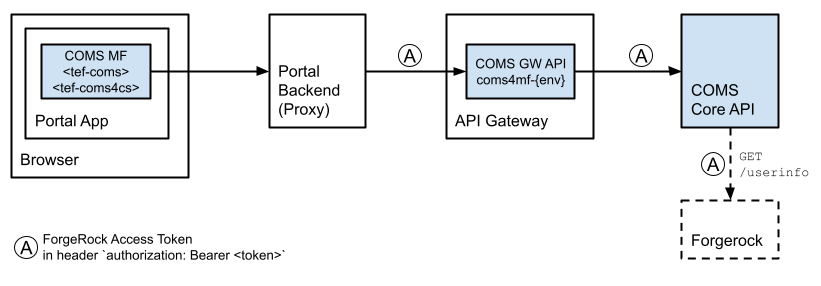
- Do not provide any of the aforementioned token attributes.
Instead, the new RAITT architecture requires the integrating portal to intercept all REST calls
from the micro-frontend to the COMS backend (via API Gateway) in order to
add the authorization header appropriately:
Authorization
In conjunction with the new RAITT architecture, the user needs the following scope:
u-672:register:ru-672:register:cu-672:consent:ru-672:consent:cu-672:consent:uu-672:profile:r
Attributes
Attributes are initializing a web component.
⚠️ This web component is initialized only once using the attributes provided at the time of creation. After initialization, any changes to attributes are ignored and will not trigger updates or re-rendering of the component. To apply new attributes, the component must be recreated.
The following attributes are supported by <tef-coms>.
Attribute names are lower-case (e.g., foobar).
registertoken
deprecated
Required unless accesstoken is provided. If both tokens registertoken and accesstoken are provided, the latter one is used as extra access token for the API Gateway.
In this scenario, there is no authenticated user, i.e., the user is anonymously creating a new customer order. However, some values have to be passed to <tef-coms> in a forgery-proof manner establishing a secure logical backend session with the integrating portal.
A register token is a JWT particularly containing spId and registerId (aka Frontend-Order-Id), e.g.:
{
  "iss": "foo.telefonica.de",
  "sub": "REG-8168746873-FOO",
  "iat": 1516239022,
  "exp": 1516257625,
  "aud": "coms.telefonica.de",
  "spId": "SP301",
  "registerId": "0815"
}
COMS decodes the JWT, validates its content, and validates its signature with a shared secret (iss-specific, HMACSHA256) which has to be configured with the COMS API.
There are the following constraints:
iss– issuer, required, to be configured with the COMS API.iat– issued at, required, number of seconds since Unix epoch, must be less or equals than 60 minutes in the past.exp– expires at, required, number of seconds since Unix epoch, must be less or equals than 120 minutes in the future.aud– audience, required, must be equals"coms.telefonica.de".sub– subject, required, any value, used for logging purposes.spId– service provider id, e.g.,"SP301", required.registerId– register id, aka frontend order id, required.
accesstoken
deprecated
Required unless registertoken is provided.
In this scenario, the user is logged in and authenticated by Piranha or ForgeRock.
The access token from Piranha or ForgeRock (OAuth 2.0, Open ID Connect) is simply passed to <tef-coms>.
The integrating portal is responsible for obtaining the access token up-front.
This only works in conjunction with the API Gateway which is responsible
for validating and resolving the access token with Piranha or ForgeRock on behalf of the COMS backend.
Please make sure you use an apiuri (see below) that connects to the COMS API via the API Gateway.
For development and testing purposes ⚠️, however, it is possible
to directly connect to the COMS API (i.e., not via API Gateway) with using a Fake Token.
It’s a JWT with the following properties.
It must be signed with the secret ach-wie-gut-dass-niemand-weiss-9 (HMACSHA256).
{
  "iss": "http://piranha.fake.de", // or "forgerock.fake"
  "sub": "...",
  "aud": "coms.telefonica.de",
  "spId": "...",
  "lcId": "...",
  "username": "..."
}
customertoken
deprecated
Required unless registertoken or accesstoken is provided.
Please note that customertoken additionally requires accesstoken
to be set with a specific access token of the API Gateway.
The customer token is sent to the COMS backend for authentication & authorization. It is a JSON Web Tokens (JWT) which is signed (HMAC SHA256, issuer-specific secret) and encrypted (AES-265/CBC/PKCS5Padding, shared secret).
The following claims are expected in the JWT payload:
-
iss – issuer, e.g.,
epos.telefonica.de. Required. -
aud – audience, e.g.,
coms.telefonica.de. Required. -
sub – subject, e.g., name or username or id of the authenticated user, e.g., customer service agent. Required.
-
exp – expiration time in epoch/seconds. Currently configured to max 2 hours into the future. Required.
-
iat – issue time in epoch/seconds. Required.
-
spId – The service provider id. Required.
-
lcId – The local customer id. The format depends on the according CRM system or IT stack.
accesstoken4p
deprecated under construction
The access token for 4th platform.
Optional if apiuri4p is provided.
spid
new raitt
The service provider id. Applicable only in conjunction with the new RAITT architecture (ForgeRock). Required.
lcid
new raitt
The local customer id. The format depends on the according CRM system or IT stack. Applicable only in conjunction with the new RAITT architecture (ForgeRock). Optional.
registerid
new raitt
The register id (aka front-end order id). Applicable only in conjunction with the new RAITT architecture (ForgeRock). Optional.
newcustomer
new raitt
Optional. Applicable only in conjunction with the new RAITT architecture (ForgeRock and Salesforce).
If true, the micro-frontend will assume a new customer registration
for a new customer as created by Salesforce just seconds or minutes ago.
Else, the micro-frontend will assume selfcare for an existing customer.
lifecycle
Required. Specifying the customer lifecycle, e.g., “webAppRegistrationProcess” or “existingCustomerInlifeMaintenance”.
apiuri
Required.
The base URI of the COMS API.
Something like https://$host.
The intended way to connect to the COMS API is via API Gateway. Depending on the environment, please use one of the following GW APIs:
coms-{env}deprecatedcoms4sfsc-{env}– only in conjunction with a customer token deprecatedcoms4mf-{env}– only in conjunction with the new RAITT architecture new raittcoms-legacy-{env}– only in conjunction with register token and Gateway access token deprecatedcoms-core-{env}– only in conjunction with the new RAITT architecture new raitt
For development or testing purposes, however, you can also directly connect to the COMS API w/o API Gateway.
apiuri4p
Optional.
Only for integrating with Novum/4th-platform there is an additional
parameter apiuri4p which is used for certain REST requests to the 4th platform.
occluri and stylecontext
deprecated
Both parameters are provided for integration with the OCCL (Telefónica’s omni-channel component library). In order to use the new Telefónica ONE Design System instead, please see below.
occluri is required.
The base URL to the OCCL including brand id.
Something like https://$host/$brandid.
stylecontext is optional.
It is a list of style-context identifiers, separated by blanks.
Each style-context identifier is mapped to a class with prefix context-
in the top-level div container inside <tef-coms>.
This top-level div container is also rendered when stylecontext is omitted.
Available style-context identifiers are specified by the OCCL.
For example, <tef-coms> is simply rendering this:
<tef-coms
  occluri="https://library.telefonica.de/1"
  stylecontext="foo bar"
>
  #shadow-root
  <link rel="stylesheet" href="https://library.telefonica.de/1/v3/components/theme-wc/bundle.css">
  <div class="context-foo context-bar">
    <!-- and all the rest -->
  </div>
</tef-coms>
In addition, all required OCCL scripts are loaded dynamically by the micro-frontend.
mode
Optional. Its value can be, e.g.,:
"multiedit"–<tef-coms>is rendered in multi-edit mode with all groups initially collapsed."multiedit:0"–<tef-coms>is rendered in multi-edit mode with group 0 initially opened for edit."multiedit:einwilligungen"–<tef-coms>is rendered in multi-edit mode with the named group “einwilligungen” initially opened for edit. If the named group doesn’t exist, it will be ignored without error and no group will initially be opened for edit."buttons"–<tef-coms>is rendered with buttons “Abbrechen” (cancel) and “Speichern” (save) at the bottom."buttons:save"–<tef-coms>is only rendered with button “Speichern” (save)."buttons:saveActive"–<tef-coms>: The “Speichern” button is always active and thus clickable."buttons:cancel"– If the user is in view mode, an additional “Zurück” button will be displayed which will trigger anaction/CANCEL_MICROFRONTENDevent. Can be added tomultiedit:by appending,buttons:cancelat the end (eg.multiedit:0,buttons:cancel)"merge"–<tef-coms>is rendered without any buttons or collapsable groups. Sets the channel to"Merge"before saving the consents."cattr:<a cattr id>:<cattr extra item id>,...": render only a single customer attribute for direct editing. You must specify which customer attribute to render (eg. “product”) and which items (comma separated) are changeable (eg. “games,insurance”)
For "multiedit" mode make sure you choose a lifecycle that has a view lifecycle configured.
For "merge" mode make sure to choose a lifecycle that has page details for merge configured, e.g., "inlifeEventMergeAccounts".
vonr
Optional. VO number to be set into some calls to the COMS API.
channel
Optional. The contact channel, e.g., Web.
Defaults to Web.
Available values: Web, AEMUnsubscribe, App, Shop, ShopDPS, SSFE, Hotline, Telesales, E-Mail, Kampagne, M2M, Unknown, Merge.
In mode "merge" the channel will be automatically set to Merge.
traceid
Optional. A trace ID to pass into all relevant requests to the COMS API.
It is set to custom header tef-coms-clienttraceid for internal logging purpose.
If traceid is not set, it will be generated.
references
Optional. A list of document references as JSON-formatted string, e.g., [{"type":"offer","source":"Ad_App_o2","id":"20004711"}].
comment
Optional. An optional field for internal purposes.
usertype
Optional. The usertype of the customer service agent. Used for logging purposes.
group
Optional. A comma-separated list of page group names to display in the given order.
This will cause the microfrontend to display those groups only. All consent values (granted/revoked) will be remembered in the browser tab’s sessionStorage.
⚠️ The integrator must make sure to call save() when all groups have been collected to actually save the consents to COMS.
The page group names can be supplied by the COMS team and depend on the concrete implementation of the user workflow the integrator wants to achieve. Please talk to the COMS team.
If the retrieved config does not have any of the groups mentioned in the group attribute, a consents/EMPTY event will be triggered.
Please also see “Usage and meaning of the “group” attribute” below!
sessionkey
Optional. Mandatory if using multiple microfrontend instances.
The sessionkey helps to keep consent data consistent when displaying the same consent data in multiple instances of the same component in one session/flow.
Important: When working with multiple instances of tef-coms in a single session/flow, you must always use the same sessionkey value.
Think of the sessionkey as a label that links different consent displays together. When multiple consent displays share the same sessionkey they will all show identical information and stay in sync with each other.
How to use it:
- Choose a unique identifier for each session/use case (such as their customer ID or a unique id)
- Use this same identifier as the
sessionkeyfor all consent displays related to that session/use case - Set the
sessionkeywhen you first create each consent display - it cannot be changed later
Example: If you’re showing customer consent information in two different sections for the same session/use case,
both sections must use the identical sessionkey to ensure they display the same consent data and stay consistent.
Methods and Properties
Web components can be referenced as objects and thus may provide “custom element methods”. Similarly, their classes may provide methods or properties.
save
A <tef-coms> element provides a save element method for saving the consents to the COMS API.
const el = document.querySelector('#consents');
await el.save(); // promise
⚠️ If your portal app loads a new page after clicking a submit button
and calling the save method, please make sure to wait for the promise to resolve
(or reject) before the document unloads.
Otherwise, the browser might cancel the save request immediately again
(which is a fetch call to the COMS API) before it was actually executed.
removeConsentGroup
This static method on the custom element can be executed when using the group attribute. It will remove all consents of the given group from the list of rendered consents.
This will cause the COMS microfrontend to NOT save those consents when save() is called or a save button is pressed.
Use this if you conditionally render some <tef-coms group="some-group" ...> and want to remove that group from the cosnents to be saved.
Usage:
window.customElements.get("tef-coms").removeConsentGroup("some-group");
Telefónica ONE Design System
new raitt
Telefónica ONE is the new easy-to-use and publicly accessible living design platform for all Telefónica products of the RAITT program. It is the successor of the OCCL design library.
For the time being, <tef-coms> will support both design systems alternatively.
The OCCL, however, is now deprecated.
For using Telefónica ONE, simply do not provide the HTML attribute occluri.
The integrating portal is responsible for loading all necessary Telefónica ONE resources.
They must be fully loaded before <tef-coms> is initialized in the page.
Events
<tef-coms> issues CustomEvents of type tef-coms.
The event’s srcElement and target is the <tef-coms> DOM element (re-targeting all events that come from further down).
All details are further specified in the event’s detail property.
<tef-coms> does not provide any visual error feedback to the front-end user.
This is dedicated to the integrating portal based on error-level events issed by <tef-coms>.
| Name | Level | Description |
|---|---|---|
config/INIT |
info |
The micro-frontend is initializing. Technically, this is immediately after the custom element has been inserted into the DOM and its connectedCallback has been called by the browser. This event can be used for performance measurements. |
auth/VALIDATE |
info |
Token validation was successful. |
auth/ERROR |
error |
Token validation failed. |
consents/LOAD |
info |
Loading consents was successful. This event is also issued when the consents are loaded from session storage (which in some scenarios they are). |
consents/SAVE |
info |
Saving consents was successful. Remark: In case MFE is displaying buttons best practise is to reload the MFE if this event is received to disable the save-button again |
consents/MERGECHANGE |
info |
User have clicked on accept merge accounts checkbox. Current state is saved in property isChecked |
consents/ERROR |
error |
Loading or saving consents or customer attributes failed. |
consents/EMPTY |
info |
There are no consents to be rendered. The micro-frontend will not visually render anything. |
consents/CHANGE |
info |
The user changed a consent. This event does not provide any further details which consents where changed. It is issued at every change, i.e., multiple times. This event is indicating that consents were changed, e.g., in order to enable an external save button. |
action/CHANGE |
info |
The user started editing consents in multi-edit mode. |
action/CANCEL |
info |
The user clicked the cancel button either in multi-edit, button or cattr mode. |
action/SAVE |
info |
The user clicked the save button either in multi-edit mode or in button mode or the save method was called. |
action/CANCEL_MICROFRONTEND |
info |
The user clicked the back (“Zurück”) button when in viewing mode. The microfrontend should be closed by the integrating party if this event occurs. |
load/READY |
info |
The micro-frontend has successfully loaded all required resources (including OCCL). This is indicating that a loading spinner (if displayed by the integrating portal) shall now be removed. It is guaranteed that either load/READY or load/ERROR is issued – exactly once. |
load/ERROR |
error |
The micro-frontend has failed. This might be due to a misconfiguration, a failure to load a required resource (including OCCL/dsOne) or usage of <tef-coms> more than once on the page. It will not visually render anything. This is indicating that a loading spinner (if displayed by the integrating portal) shall now be removed. It is guaranteed that either load/READY or load/ERROR is issued – exactly once. |
In addition to the events listed above, there are also tracking events issued. See section Tracking below.
For listening to all events issued by <tef-coms>, place something like this into your page:
<script>
   document.addEventListener('tef-coms', function(e) { console.log(e); });
</script>
For debugging purposes you can switch on the event logs with the help of a variable in the local session storage. To do this, enter the following in the browser console:
localStorage.setItem('tef-coms-debug-mode', 'true');
Below are a couple of sample events.
Please note that all properties message and statusText are not formally specified, i.e., they will be subject to change and/or are platform-specific. ⚠️
CustomEvent {
  type: "tef-coms",
  detail: {
    name: "consents/LOAD",
    level: "info",
    message: "consents loaded successfully"
  }
}
CustomEvent {
  type: "tef-coms",
  detail: {
    name: "consents/ERROR",
    level: "error",
    message: "loading or saving consents failed",
    error: {
      name: "Error",
      statusCode: 400,
      statusText: "Bad Request",
      message: "\"lifecycle\" must be one of [webAppRegistrationProcess, mobileAppsInitialLogin, ...]"
    }
  }
}
CustomEvent {
  type: "tef-coms",
  detail: {
    name: "auth/ERROR",
    level: "error",
    message: "token validation failed",
    error: {
      name: "Error",
      statusCode: 401,
      statusText: "Unauthorized",
      message: "user not found"
    }
  }
}
CustomEvent {
  type: "tef-coms",
  detail: {
    name: "auth/ERROR",
    level: "error",
    message: "token validation failed",
    error: {
      name: "TypeError",
      // network error does not have status code
      message: "Failed to fetch"
    }
  }
}
Logging
<tef-coms> does some basic logging to its backend’s POST /service/mfe/log endpoint.
Tracking
<tef-coms> also issues CustomEvents for tracking purposes.
They are of type tef-coms with the name TRACKING.
There is a data property with event-specific information.
It contains a property event indicating the type of event
and further event-specific properties. For example:
CustomEvent {
  type: "tef-coms",
  detail: {
    name: "TRACKING",
    level: "info",
    data: {
      event: "changePermissions",
      ...
    },
  }
}
Portals need to catch these events and push them into their GTM dataLayer.
Something like this:
document.addEventListener('tef-coms', function(e) {
  if (e.detail.name === 'TRACKING') {
    dataLayer.push(e.detail.data);
  }
});
There are the following events submitted:
startChangePermissions– Only in “multiedit” mode when clicking the “Ändern” button to start editing a group of consents.cancelChangePermissions– Only in “multiedit” mode when clicking the “Abbrechen” button to cancel editing a group of consents.changePermissions– When calling the micro-frontends’ssave()method to save all consents or consent changes.clickCollapsable– When the oneclick collapsile is opened (only once).comsError– When an error occurred, mostly during startup.
Clicking a checkbox does not issue a TRACKING event.
Distribution
The following bundles are available:
- tef-coms.js (ES6)
As of Apr 2023, ES5 is no longer supported. ⚠️
The last version supporting ES5 is 2.11.
The distribution looks like this:
.
├── tef-coms.js
├── tef-coms.js.map
├── typings.d.ts
├── index.html # this page
├── test.html # a test page
└── browsercheck.js
Browser Support
The key technology used here is standard web components (v1). It is guaranteed to work in the latest two versions of all major browsers: Chrome, Firefox, Edge, Safari, Safari/iOS.
As of Feb 2021, IE is no longer supported. ⚠️
As a general rule, only browsers with native support for Web Components (custom elements and es6 modules) are supported. Consequently, it is no longer recommended nor required to load polyfills for Web Components.
We recommend the following approach:
<head>
  <meta charset="utf-8">
  <meta name="viewport" content="width=device-width, minimum-scale=1, initial-scale=1, user-scalable=yes">
  <meta http-equiv="X-UA-Compatible" content="IE=Edge" />
  <!-- browser detection -->
  <script src="browsercheck.js"></script>
  <script>
    if (window.BrowserCheck.blacklisted()) {
      document.location = 'error.html'; // redirect
    }
  </script>
  <!-- load coms micro-frontend -->
  <script type="module" src="tef-coms.js"></script>
It uses a little helper script browsercheck.js that checks for blacklisted browsers, i.e., whether Web Components are natively supported.
Please make sure to load the micro-frontend as a module: type="module" ⚠️
Initial Load & Performance
Before the micro-frontend is able to render something visible on the screen, a couple of resources have to be loaded under the hood. All of them are required. These requests are submitted as early and as parallel as possible, of course.
- OCCL style resources (2 scripts and 1 stylesheet)
- COMS API calls for token validation (auth) and loading of consents (sequentially)
The event config/INIT is indicating that the micro-frontend is starting up
(technically, this is immediately after the custom element has been inserted
into the DOM and its connectedCallback has been called by the browser).
The event load/READY is indicating that all required resources were loaded
and the micro-frontend is now rendering something visual.
If any of the resources cannot be loaded (for whatever reason),
the event load/ERROR is issued instead – without rendering anything visual.
If you are looking for performance measurements, these might make sense:
- document load until the micro-frontend’s
config/INITevent – pre-micro-frontend load time until the micro-frontend is actually created and starting up. - the micro-frontend’s events
config/INITuntilload/READY– the time needed by the micro-frontend to get ready for rendering, i.e., to load all required resources.
Versioning
<tef-coms> supports Semantic Versioning.
Global Resources
All global resources used by <tef-coms> are pre-fixed. In particular:
- Session storage key is
tef-coms-state. - Console logging is prefixed
tef-coms:.
Single customer attribute edit mode
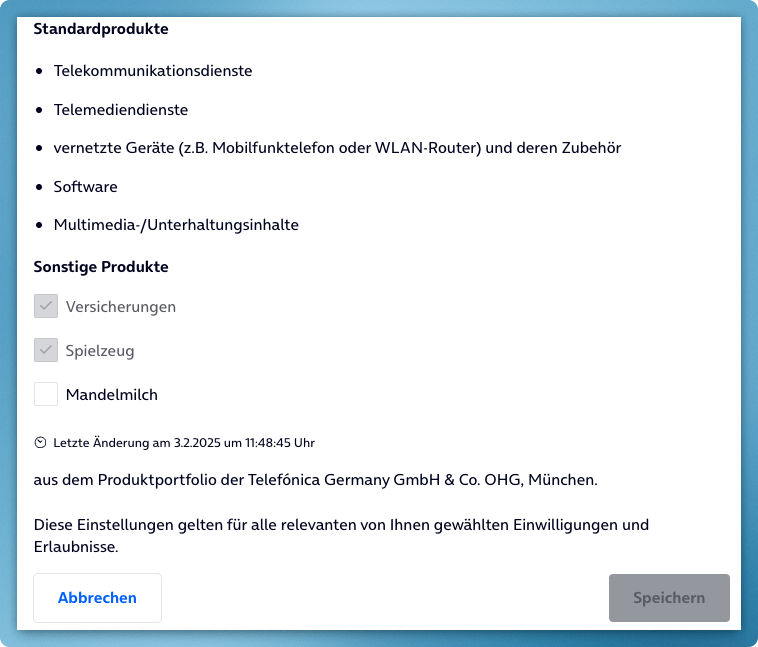
It is possible to display and edit a single customer attribute. This can be used for campaigning consents for a single customer attribute.
Only not granted and configured customer attribute items will be editable. Items that are already granted will not be editable.
Load the javascript as usual (see above) and use the following tef-coms mode attribute:
<tef-coms ... mode="cattr:CATTRID:CATTRITEMID1,CATTRITEMID2" ... ></tef-coms>
All values are colon-separated and consist of the customer attribute id and (optionally) a comma separated list of customer attribute items that should be editable if they are not already granted.
cattr : Static, triggers the single customer attribute edit mode.
CATTRID: The id of a single customer attribute like “product”.
CATTRITEMID1,..: A list of customer attribute item ids of the CATTRID specified before.
If left empty all customer attribute items will be displayed for editing.
The usual events will be triggered but with a different context:
| Event | Context |
|---|---|
action/SAVE |
The customer attribute items have been saved and the includign page can react eg. with a Thnak you note. |
action/CANCEL |
The user clicked the CANCEL button. The integrating page should react accordingly. |
consents/ERROR |
The customer attribute with the id CATTRID does not exist.No content will be rendered and the integrating portal should display a message. |
consents/EMPTY |
The user doesn’t see any editable customer attribute items. No content will be rendered and the integrating portal should display a message. |
Usage and meaning of the “group” attribute
Using the group attribute fundamentally changes the way the microfrontend works.
Without group the microfrontend will display all consent group at once, enabling the customer to set all his consents on a single page.
With group only the mentioned consent group(s) will be rendered and only those can then be switched by the customer. The consent status (granted / revoked) will be kept in memory until the save() method is called on the microfrontend tag. This will then save all consents the customer has configured in the current browser session to COMS database.
It is important to only have one <tef-coms> tag in the DOM at any time.
If your app needs to render multiple tef-coms tags on one page you need to use the sessionkey attribute !
Example 1
The user workflow consists of an IBAN entry page and a POSTAL ADDRESS page connected by a step-by-step interface using a real page reload and not a SPA.
You can use group to display a IBAN specific consent (eg. “Allow us to use your IBAN to determine if you are connected to other customers”) on the IBAN step and use another microfrontend invocation with a different group to display POSTAL ADDRESS relevant consents (eg. “We use your address to send you promotions”).
Both groups will be rendered in the appropriate places determined by the integrator and every consent click the customer does will be tracked in memory. After all consents have been displayed the integrator must make sure to call the save() method on the microfrontend tag to actually save all collected consents (IBAN + POSTAL ADDRESS) to COMS.
Example 2
The user workflow consists of an IBAN entry page and a POSTAL ADDRESS page connected by a step-by-step interface that is driven by Vue/React as a single page app without real reload.
You can use group to display a IBAN or POSTAL ADDRESS specific consent as described in Example 1 but now you must make sure to always use the same sessionkey attribute on all tags on the page.
If the customer can repeat the same process in your app multiple times (eg. for multipe SIM cards) make sure to set the sessionkey to a unique value every time the process starts anew (eg. a new SIM card is entered).